Convert PNG to SVG with Editable Text
Most image-to-SVG tools destroy typography by tracing glyphs into static paths. Fig2SVG reconstructs readable, properly positioned SVG text elements you can fix in seconds.
Convert with editable text · Compare plans · Browse all examples
Why use Fig2SVG
- Real <text> and <tspan> elements: Click directly on any title, legend item, or numeric value in Figma, Illustrator, or PowerPoint and type your correction.
- Subscripts, superscripts & units: Preserves scientific notation like CO2, m/s^2, eV, and Greek letters using structured baseline and offset attributes.
- Built-in inline text editor: Need a quick typo fix before exporting? Edit any label string and preview or save changes right inside the Fig2SVG inspector.
Why editable <text> beats outlined paths for real editing workflows
| Workflow Task | Fig2SVG (Native <text>) | Outlined Path Converters |
|---|---|---|
| Fixing a typo or reviewer unit change | Double-click text node and edit in 5 seconds | Delete every letter path and re-type manually |
| Updating plot axis ticks (0..100) | Edit numeric text string directly | Realign dozens of traced digit shapes |
| Translating figure labels to another language | Swap label copy while keeping alignment | Full text replacement from scratch |
| Font family & size adjustments | Standard SVG font-size, font-weight, and fill attributes | Locked to traced outline widths |
| PowerPoint / Google Slides text import | Compatibility mode normalizes baselines cleanly | Imports as frozen graphics, uneditable in slides |
Matching Editable SVG Examples
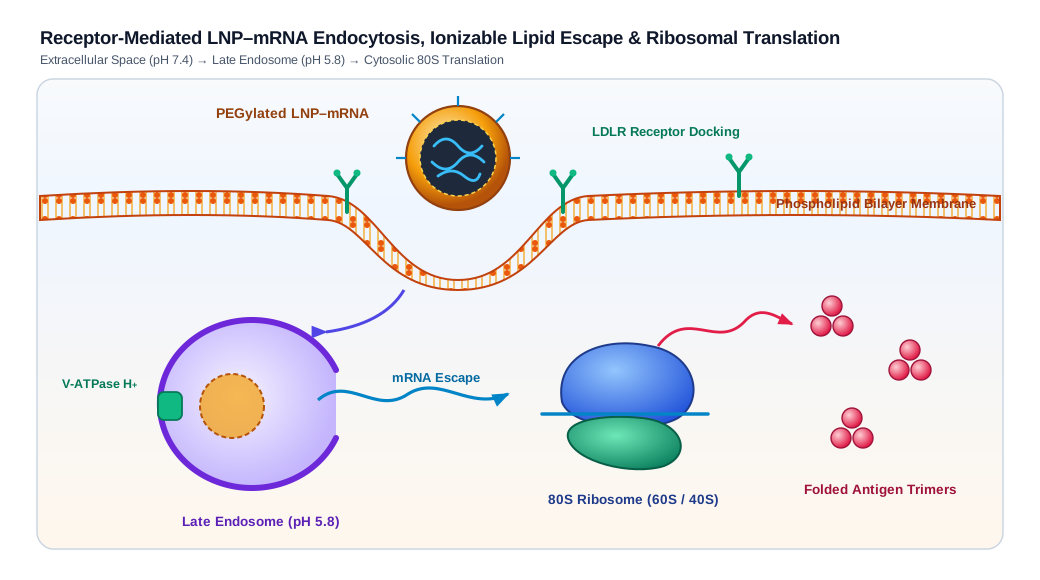
LNP-mRNA Cellular Endocytosis & Translation Mechanism — Scientific figures: Biomolecular illustration of lipid bilayer invagination, LDLR receptor-mediated LNP–mRNA uptake, late-endosomal proton escape, and 80S ribosomal antigen translation.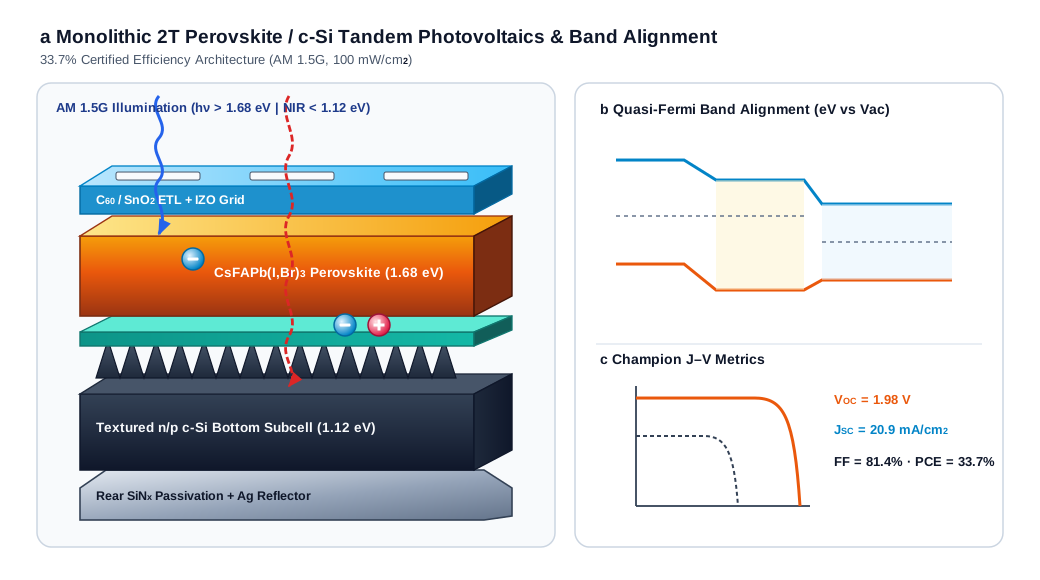
Perovskite-Silicon Tandem Solar Cell & Band Alignment — Scientific figures: 2.5D isometric perovskite/c-Si tandem heterostructure with textured Si pyramids, reusable e⁻/h⁺ photocarriers, quasi-Fermi band alignment, and J–V curve.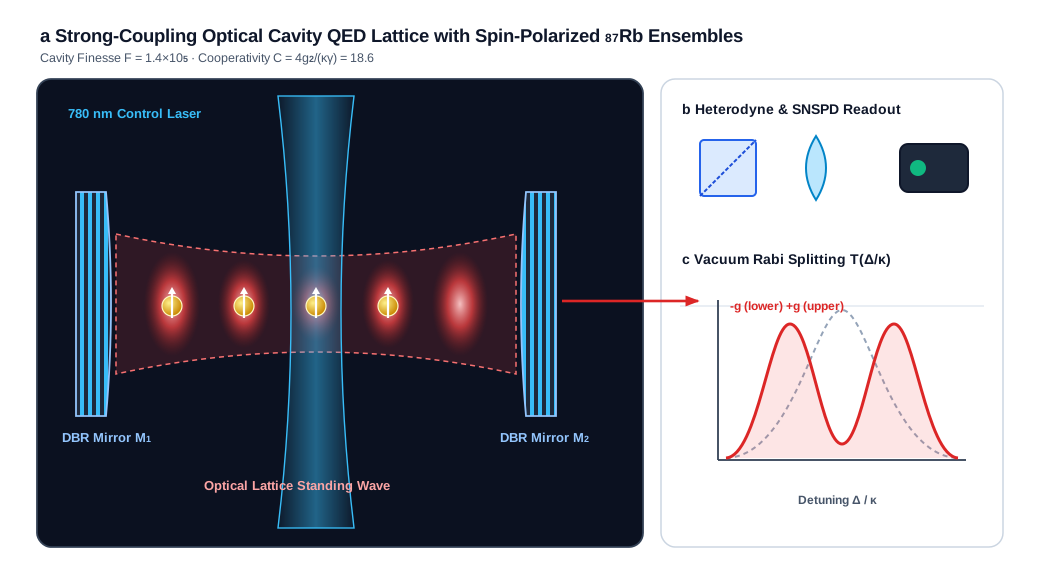
Cavity QED Optical Lattice & Vacuum Rabi Splitting — Scientific figures: High-finesse optical DBR cavity schematic with standing-wave Gaussian antinodes, spin-polarized 87Rb atoms, dichroic beam optics, and Vacuum Rabi Splitting spectrum.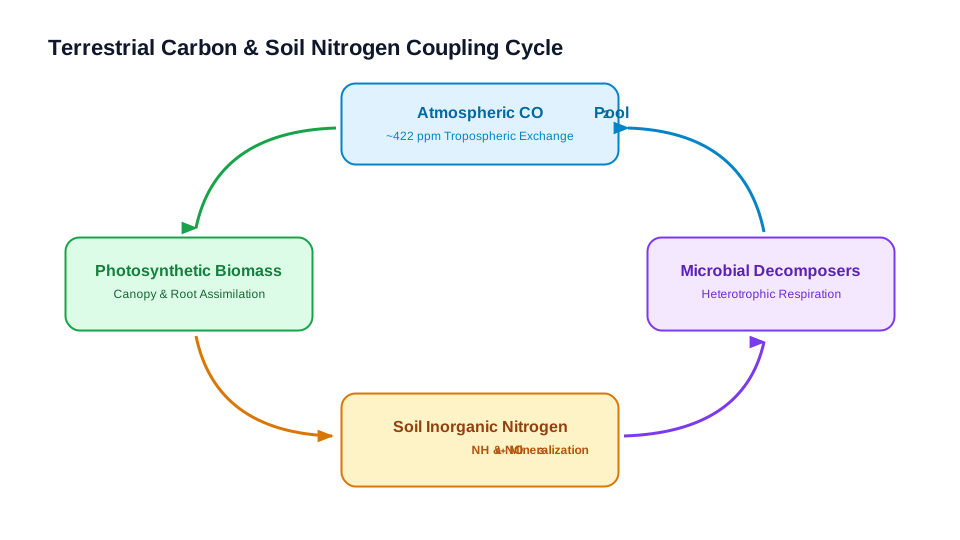
Ecosystem Carbon & Soil Nitrogen Cycle — Scientific figures: STEM teaching diagram with biogeochemical reservoirs, curved feedback arrows, and native chemical sub/superscripts.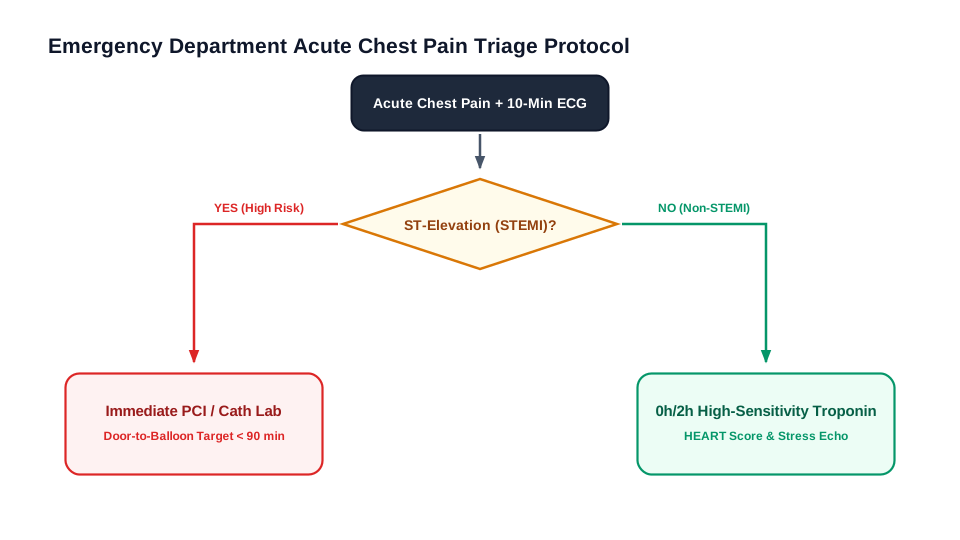
Clinical Acute Chest Pain Triage Decision Tree — Flowcharts & architecture: Clinical emergency triage decision tree with diamond assessment nodes, Yes/No pathways, and risk-stratified disposition cards.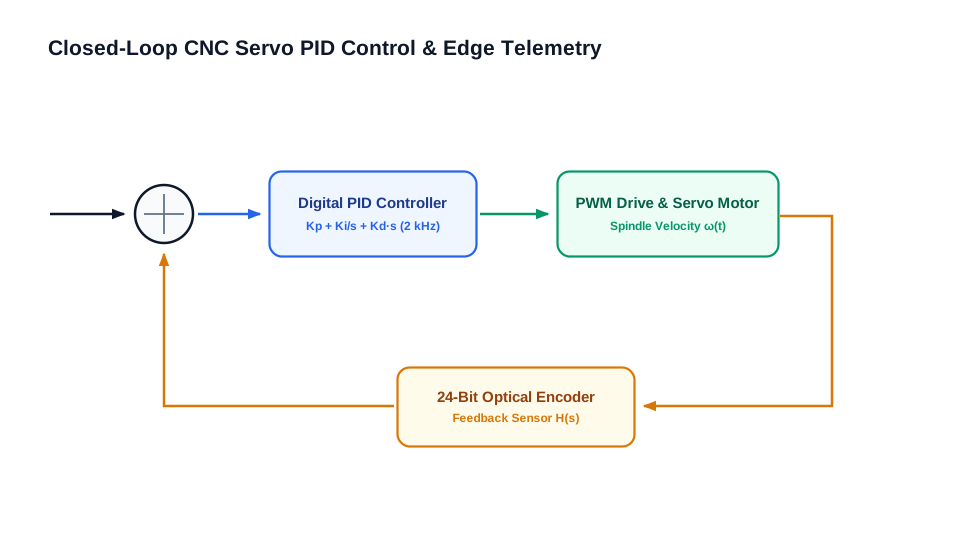
Industrial PID Control & Edge Telemetry Loop — Flowcharts & architecture: Closed-loop servo control schematic with summing junction, PID controller, PWM drive, optical encoder feedback, and telemetry bus.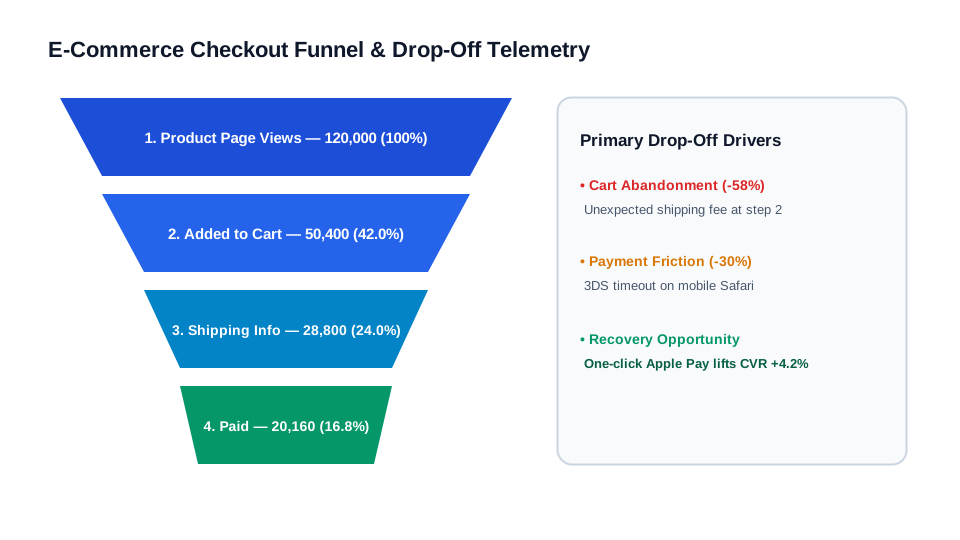
Checkout Conversion Funnel & Drop-off Chart — Charts: Four-stage e-commerce conversion funnel with trapezoid polygon stages, step conversion rates, and drop-off reason cards.
Q4 Cloud Infrastructure Spend Breakdown — Charts: Multi-segment donut chart with circular SVG arc paths, hollow center run-rate KPI, and category legend cards.
How it works
- Upload your labeled figure or chart: Even dense figures with rotated axis titles, subscripts, and multi-line callouts keep separated text and shape layers.
- Review or edit text labels inline: Filter the inspector by Text objects to inspect every transcribed string, preview color/copy changes, or save directly to the SVG.
- Open cleanly in Figma, Illustrator, or PowerPoint: Export standard SVG for design tools or enable compatibility mode for smooth PowerPoint / Keynote editing.
Frequently Asked Questions
Does Fig2SVG keep text editable inside Adobe Illustrator and Figma?
Yes. Text is emitted as genuine SVG <text> (and <tspan>) nodes with position, size, weight, and fill color rather than compound paths.
What about scientific notation like CO2, H2O, or alpha/beta symbols?
Multi-part labels and sub/superscript notation are reconstructed cleanly so you can continue editing formulas without losing layout.
Can I edit text directly on the Fig2SVG website before downloading?
Yes. Select any text object in the side inspector on the Result page to preview text and color updates or save a revised SVG immediately.
Will PowerPoint flatten my text when I import the SVG?
You can download the standard SVG or enable PowerPoint & Figma compatibility mode, which normalizes text baselines and flattens markers cleanly for slides.
Related Vector Conversion Guides
- PNG to Editable SVG — Rebuild PNG, JPG, and TIFF figures into layered vectors with separate objects, modules, and clean SVG paths.
- Image to PowerPoint & Figma SVG — Compatibility-flattened arrowheads and normalized baselines for lossless import into PowerPoint, Keynote & Figma.
- Scientific Figures to SVG — Rebuild Nature-style schematics, CFD/FEA contours, device stacks, and cell pathways into publication-ready vectors.
- Fig2SVG vs Vectorizer.ai — Objective comparison: semantic SVG reconstruction with editable text & modules vs pixel boundary auto-tracing.
Need help or billing support? Contact support@fig2svg.online.